Save $80

Popular right now


 Ergo Workspace SetDeskMate Pro + X-Stand + Precision MousePad
$259
 Productivity BundleNomaDesk TriView + DeskMate Pro + Precision MousePad
$779
 Mobile Office EssentialsDeskMate Pro + 15W Laptop Sleeve + Precision MousePad
$269
 Traveller BundleTraveller Bag + DeskMate Pro + Travel Tech Organiser
$349

Popular right now
 DeskMate ProPortable Workstation
$159
 NomaDesk TriViewPortable Monitors
$649
 X-StandErgonomic Laptop Stand
$109
 15W Laptop SleeveCharges 3 Devices
$149
 Travel Tech OrganiserAll Your Tech Organised
$69
 Traveller BagTravel & Everyday
$149
Yes—turn one laptop into a three-screen workspace, so your documents, messages, and work stay in view. TriView fits any 12–18 inch laptop and works with any Mac with an M1 chip or later, or any Windows laptop running Windows 10 or later.
Just one available USB-C or USB-A connection powers and drives both screens—so you can work across three displays without a desk full of cables. When you purchase the product, you'll receive both the USB-C and USB-A cables in your order. Install the driver once, connect the cable, and keep the windows you need open side by side.
Yes, but only once. Follow the included guide to install the driver, then plug in whenever you need more screen space.
No—the built-in kickstand carries the full weight of the monitor, so your laptop does not have to hold up the extra screens. You get a supported workspace for reading, writing, and comparing side by side, without relying on your laptop’s hinge to carry the load.
TriView weighs 1.8 kg including cables and folds to just 3 cm thick—slightly bigger than your laptop. Pack it in its protective carry case and take your three-screen workspace with you. It is a practical way to keep your workflow together when you move between desks or travel for work.
Usually, no. Most laptops can power both screens through the same cable, so you can get to work without searching for another outlet. If your battery is low, or your laptop has limited power, connect its charger to keep power consistent while you work.
Yes—keep your laptop connected to its own charger while you use TriView, so a low battery does not interrupt your workflow. You will need an available charging connection alongside the USB-C or USB-A connection for the screens. Check your laptop’s ports before ordering to confirm your setup.
You do not have to figure it out alone. Start with the included step-by-step setup guide. If a driver or display setting holds you up, email support@thenomadesk.com for help from the NomaDesk team—so you can get both screens working and get back to the work you bought them for.
Yes—try TriView with your own laptop, your own apps, and your normal workday. You have 30 days to see whether the extra screen space works for you. If it is not the right fit, email NomaDesk within 30 days of delivery to arrange a return.
Your TriView is covered if it develops a fault within the first 12 months. NomaDesk will repair or replace it, giving you a clear path to support after your purchase. You can put it to work with added peace of mind; see the warranty policy for full terms.
 1 DeskMate
$159
 2 DeskMate
$280
 Free 2× Precision MousePads + Keyboard Lifts
Get one for you and a colleague.
 ×3
 3x MousepadsFREE
×3
 3x Keyboard LiftsFREE
1 DeskMate
$159
2 DeskMate
$280
 Free 2× Precision MousePadsFREE
 3x Complete DeskMate Pro Kits
×3
3x Precision MousePadsFREE
×3
 3x Keyboard LiftsFREE
FREE THIS MONTH ONLY
$280
$596
Save 53%
or 4 interest-free payments of $70.00 with

Order Within 4 hours For Free Dispatch Today.
30-Day Return Promise
If your DeskMate doesn't make working from your laptop more comfortable within 30 days, return it for a full refund. No questions asked.
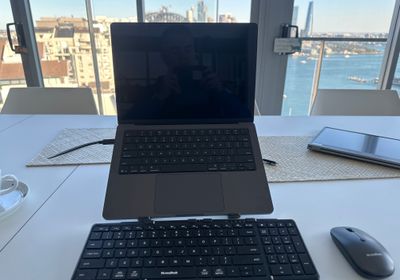
 Laptop standSix Adjustable Heights
 Full-size keyboardTri-Fold.
 Wireless MouseSilent-click, Rechargeable.
 Phone StandHands-free Viewing.
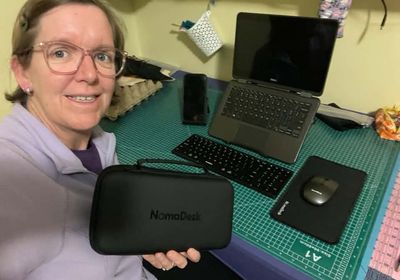
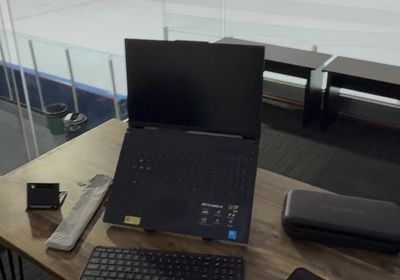
 All In one Case.Packs down to the size of a waterbottle and weighs <1kg.
$280
How it works
Can you use the tri screen and have it raised with the stand for all 3 screens to be at eye level
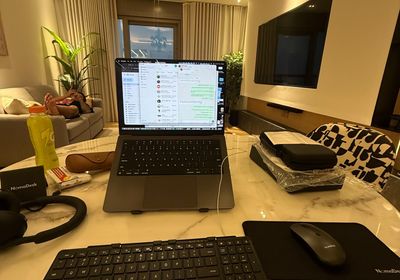
I've tried heaps of laptop stands and work setups before, but I just never end up using any of them because they just don't come with the full kit. With the NomaDesk, everything comes in the small case, which I absolutely love, and it's just a setup that I actually use, compared to all the other ones that just ended up in the bin.
Just used ours for the first time and it's awesome!
Best product i have used in a long time. Very convenient and am happy to recommend this to my colleagues.
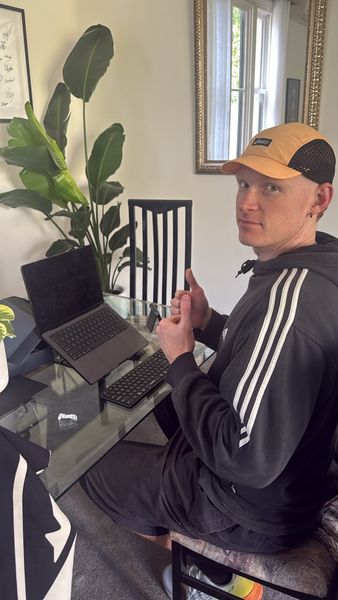
This purchase has been so useful since it arrived. I work in different places and my laptop just wasn't comfortable to use on it's own. This has fixed that and it's so portable so it actually comes with me! Highly Recommend.
Lift the laptop and your screen reaches eye level — but the keyboard and trackpad go with it. Fix one, and another problem starts.


Ready made
A full month using it where you actually work — home, café, hotel, client site.
Covered for a year from the day it arrives, keyboard and mouse included.
Tracked from our door to yours.
Engineered in-house and design protected. You get the original, not a copy of it.
Everything people ask before they buy. Still unsure? Email support@thenomadesk.com and a human answers.
Because it's not parts — it's a system. Random pieces add up to $200+, with no warranty and four things to keep track of. DeskMate Pro is one organised, patent-protected workstation for less.
Yes. Engineered in-house, patented globally, no copies or clones exist.
Yes. The angled stand lifts your laptop to eye level and the full-size keyboard keeps wrists neutral — no more neck or shoulder strain by 4pm.
It folds to under 1kg, the size of a water bottle. Slides into any laptop bag. Once you've worked properly anywhere, going back feels brutal.
Yes — works with every laptop that has a Bluetooth connection or USB-A port. Windows and Mac.
Rock solid. Anti-slip feet and a rigid centre panel keep it stable on any surface — desks, café tables, hotel rooms, anywhere.
Under 30 seconds. Pop the stand → unfold the keyboard → switch on the mouse → connect Bluetooth.
Yes. We offer bulk pricing for teams, and on orders of 50 or more we can add your company logo to every case. Get a quote on our Corporate Gifting page.
Try it for 30 days. If it's not right for you, send it back — no questions asked. If anything breaks in the first 12 months, we replace it, full stop.



 Verified Reviewer